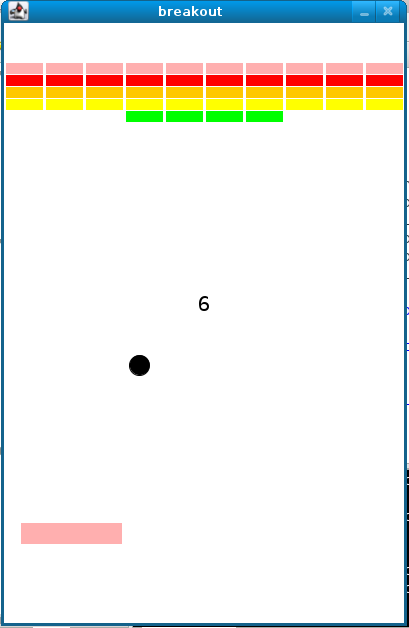
Reviving one of my favorite childhood games, Arkanoid.
/**
 * breakout.c
 *
 * Computer Science 50
 * Problem Set 4
 *
 * Koren Leslie Cohen
 *
 * Creates Breakout game.
 */

// standard libraries
#define _XOPEN_SOURCE
#include <stdio.h>
#include <stdlib.h>
#include <string.h>
#include <time.h> // access to psuedorandom number generator (PRNG)

// Stanford Portable Library
#include "gevents.h"
#include "gobjects.h"
#include "gwindow.h"

// height and width of game's window in pixels
#define HEIGHT 600
#define WIDTH 400

// paddle dimensins
#define PADDLEHEIGHT 20
#define PADDLEWIDTH 100

// number of rows of bricks
#define ROWS 5

// number of columns of bricks
#define COLS 10

// radius of ball in pixels
#define RADIUS 10

// lives
#define LIVES 3

// prototypes
void initBricks(GWindow window);
GOval initBall(GWindow window);
GRect initPaddle(GWindow window);
GLabel initScoreboard(GWindow window);
void updateScoreboard(GWindow window, GLabel label, int points);
GObject detectCollision(GWindow window, GOval ball);

// number of lives initially
int lives = LIVES;

// number of points initially
int points = 0;

int main(void)
{
    // seed pseudorandom number generator
    // means to initialize in such a way that the numbers it will eventually spit out will appear random
    // it's deliberate that we're initializing PRNG with the current time: time's always changing
    srand48(time(NULL));

    // instantiate window
    // creates a new graphical window, returning some sort of reference thereto
    // it's technically a pointer, but the * is hidden by SPL
    // return value is stored in variable called window, whose type is GWindow
    // declared in a gwindow.h header file
    GWindow window = newGWindow(WIDTH, HEIGHT);

    // instantiate bricks
    // a function the creates a grid of bricks atop game's window
    initBricks(window);

    // instantiate ball, centered in middle of window
    // passed into function is window so that function knows where to place (draw) the ball
    // function returns a GOval whose width and height will be equal (circular)
    GOval ball = initBall(window);

    // instantiate paddle, centered at bottom of window
    // returns a graphical rectangle
    GRect paddle = initPaddle(window);

    // instantiate scoreboard, centered in middle of window, just above ball
    // simply a graphical label
    GLabel label = initScoreboard(window);

    // number of bricks initially
    int bricks = COLS * ROWS;

    // initial velocity
    // use drand48 to make initial velocity random along horizontal x-axis
    double velocity = drand48();
    double velocityY = 2;

    // keep playing until game over
    // loop keeps going and going as long as there are bricks left
    while (lives > 0 && points < 50)
    {
        // PADDLE MOVEMENT

        // check for mouse event
        GEvent event = getNextEvent(MOUSE_EVENT);

        // if we heard one
        if (event != NULL)
        {
            // if the event was movement
            if (getEventType(event) == MOUSE_MOVED)
            {
                // ensure paddle follows cursor
                double x = getX(event) - getWidth(paddle) / 2;
                int y = 500;
                setLocation(paddle, x, y);
            }
        }

        // BALL MOVEMENT

        // move ball (up and down and at angles)
        move(ball, velocity, velocityY);

        // bounce off right edge of window
        if (getX(ball) + getWidth(ball) >= getWidth(window))
        {
            velocity = -velocity;
        }

        // bounce off top edge of window
        else if (getY(ball) <= 0)
        {
            velocityY = -velocityY;
        }

        // bounce off left edge of window
        else if (getX(ball) <= 0)
        {
            velocity = -velocity;
        }

        // if ball hits bottom of window - lose life, re-position, keep track of lives
        else if (getY(ball) + getHeight(ball) >= getHeight(window))
        {
            lives = lives - 1;
            waitForClick();
            setLocation(ball, 190, 290);
            setLocation(paddle,150, 500);
        }

        // ball to bounce off paddle
        GObject object = detectCollision (window, ball);

        if (object == paddle)
        {
            velocityY = -velocityY;
        }

        // if ball hits brick, brick disappears, scoreboard updated
        if (object != NULL)
        {
            // if object (brick) hit (not the paddle or scoreboard)
            if (strcmp(getType(object), "GRect") == 0 && object != paddle && object != label)
            {
                removeGWindow(window, object);
                velocityY = -velocityY;
                points = points + 1;
                updateScoreboard (window, label, points);
            }
        }

        // linger before moving again
        pause(10);
    }

    // wait for click before exiting
    // a function so window doesn't close until user intends
    waitForClick();

    // game over
    closeGWindow(window);
    return 0;
}

/**
 * Initializes window with a grid of bricks.
 */
void initBricks(GWindow window)
{
    // initialize variables
    int i, j, y;
    int x = -38;

    // instantiate bricks in window, ROWS and COLS represent grid dimensions
    // iterate over columns
    for (j = 0; j < COLS; j++)
    {
        // create the row of 10 bricks (10 cols)
        x = x + 40;
        y = 40;
        GRect brick = newGRect(x, y, 36, 10);
        add (window, brick);

        // set color for initial row of 10 cols
        setColor(brick, "PINK");
        setFilled(brick, true);

        // create a row of bricks under each col in row (5 rows)
        for (i = 0; i < ROWS - 1; i++)
        {
            y = y + 12;
            GRect brick = newGRect(x, y, 36, 10);
            add (window, brick);

            // set colors for each row individually
            if (i == 0)
            {
                setColor(brick, "RED");
                setFilled(brick, true);
            }

            if (i == 1)
            {
                setColor(brick, "ORANGE");
                setFilled(brick, true);
            }

            if (i == 2)
            {
                setColor(brick, "YELLOW");
                setFilled(brick, true);
            }

            if (i == 3)
            {
                setColor(brick, "GREEN");
                setFilled(brick, true);
            }
        }
    }
}

/**
 * Instantiates ball in center of window.  Returns ball.
 */
GOval initBall(GWindow window)
{
    // instantiate ball, center bottom of window
    GOval ball = newGOval (190, 290, 20, 20);

    // add ball to window
    add(window, ball);

    // color and fill
    setColor(ball, "BLACK");
    setFilled(ball, true);

    return ball;
}

/**
 * Instantiates paddle in bottom-middle of window.
 */
GRect initPaddle(GWindow window)
{
    // instantiate paddle, centered bottom middle
    GRect paddle = newGRect (150, 500, PADDLEWIDTH, PADDLEHEIGHT);

    // add paddle to window
    add(window, paddle);

    // colored and filled
    setColor(paddle, "PINK");
    setFilled(paddle, true);

    return paddle;
}

/**
 * Instantiates, configures, and returns label for scoreboard.
 */
GLabel initScoreboard(GWindow window)
{
    // instantiate scoreboard, value is a number (a char*)
    GLabel label = newGLabel (" ");

    // add scoreboard to window
    add (window, label);

    // location of scoreboard
    setLocation(label, 100, 100);

    // font/size of scoreboard
    setFont(label, "Arial-20");

    return label;
}

/**
 * Updates scoreboard's label, keeping it centered in window.
 * Converts the int to a string (char*) using function sprintf.
 * Sets label to that value.  Re-centers label (in case int has
 * more digits than previous int).  Set array size of 12 initially.
 */

void updateScoreboard(GWindow window, GLabel label, int points)
{
    // update scoreboard
    char s[12];
    sprintf(s, "%i", points);
    setLabel(label, s);

    // center scoreboard in window
    double x = (getWidth(window) - getWidth(label)) / 2;
    double y = (getHeight(window) - getHeight(label)) / 2;
    setLocation(label, x, y);

}

/**
 * Detects whether ball has collided with some object in window
 * by checking the four corners of its bounding box (which are
 * outside the ball's GOval, and so the ball can't collide with
 * itself).  Returns object if so, else NULL.
 */

// given GOval, determines whether ball has collided with GObject
// GRect, GOval, GLabel --> all treated as a GObject
// checks the corners of balls bounding box

GObject detectCollision(GWindow window, GOval ball)
{
    // ball's location
    double x = getX(ball);
    double y = getY(ball);

    // for checking for collisions
    GObject object;

    // check for collision at ball's top-left corner
    object = getGObjectAt(window, x, y);
    if (object != NULL)
    {
        return object;
    }

    // check for collision at ball's top-right corner
    object = getGObjectAt(window, x + 2 * RADIUS, y);
    if (object != NULL)
    {
        return object;
    }

    // check for collision at ball's bottom-left corner
    object = getGObjectAt(window, x, y + 2 * RADIUS);
    if (object != NULL)
    {
        return object;
    }

    // check for collision at ball's bottom-right corner
    object = getGObjectAt(window, x + 2 * RADIUS, y + 2 * RADIUS);
    if (object != NULL)
    {
        return object;
    }

    // no collision
    return NULL;
}
Voila!

Product manager at Facebook. Former senior product manager at Dollar Shave Club in Los Angeles and software engineer at J.Crew / Madewell in New York City. Recovering trial lawyer.
Latest posts by Koren Leslie Cohen (see all)
- PM Career Story - April 28, 2022
- How to Transition into Product Management - December 26, 2017
- What I’ve Learned in My First Few Months as a Product Manager - October 14, 2015

Hi Koren,
thank you so much for sharing this p-set solution! It certainly speeded up a couple of parts!
I am going through a similar change of life myself and so here I am attending CS50 on edX. 🙂
All the best!
Federico